
An Amazon A+ Content module example is most useful when it shows how a particular layout answers a shopper's question. Someone considering a standing desk may need to check dimensions and adjustment range. A shopper buying a kitchen appliance may want to understand how it works, which accessories are included, and how it compares with another model.
The module sequence should follow those questions. Each section needs a distinct purpose, giving shoppers the information they need without making the product page feel like a collection of repetitive promotional graphics. When planning an Amazon A plus content layout, sellers often wonder whether their ebc module sequence will keep mobile buyers engaged or cause them to bounce before reaching the reviews.
This guide maps five Amazon module types to a practical sequence, with sample copy, Amazon A+ content module sizes, and examples for different product categories.
What Is an Amazon A+ Content Module Example?
An Amazon A+ Content module example demonstrates how a specific layout presents product information through images, headlines, supporting text, specifications, or comparison charts.
Amazon provides a library of module types through A+ Content Manager. Its official A+ Content Examples documentation identifies modules such as Standard Header Image with Text, Standard Three Images & Text, Standard Image Sidebar, Standard Tech Specs, and Standard Comparison Table.
According to Amazon's A+ Content help page, Basic A+ supports up to five modules selected from 14 types. Premium A+ supports up to seven modules selected from 19 types, with additional formats such as video, interactive hotspots, navigation carousels, and dedicated Amazon premium A+ content modules.
The sequence below is a practical framework for Basic A+, not an official Amazon-mandated order or a guaranteed conversion formula. Choose modules according to the information your customers need.
A Practical Five-Module A+ Content Sequence
The following sequence works well as a starting point for products that need both visual explanation and technical detail. A simpler product may need fewer sections, while a complex one may benefit from demonstrating its main function earlier.
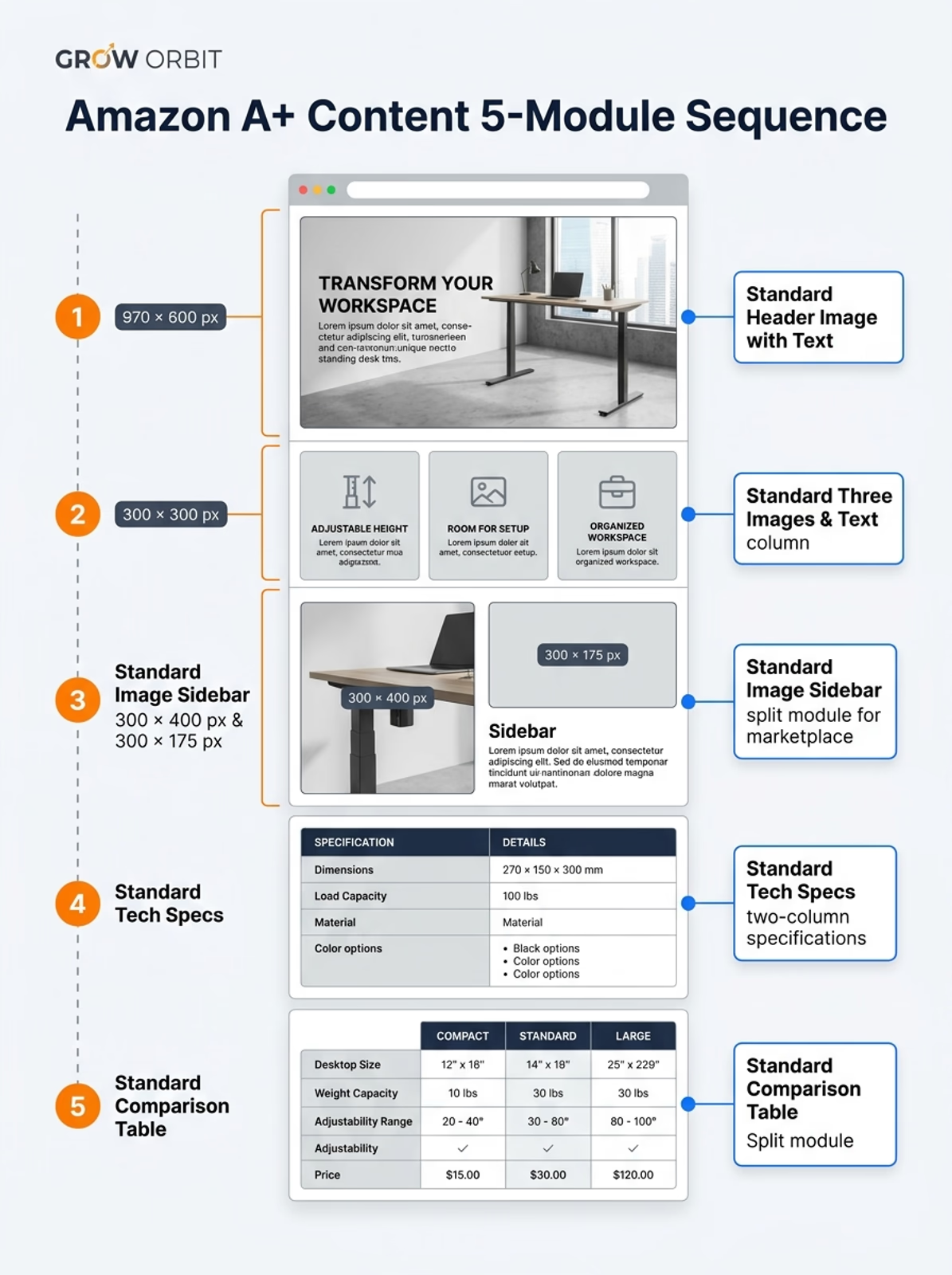
Note: Illustrative design wireframe diagram featuring dummy brand specifications for educational demonstration only.
1. Standard Header Image with Text: Introduce the Product
The first module should establish what the product is and why a shopper might consider it.
A clear product image, one concise headline, and a supporting statement are often enough. Save detailed specifications for later sections, where customers can examine them more closely.
Example: Adjustable standing desk
- Headline: A workspace that adjusts to your day
- Supporting copy: Set your working height with an adjustable desk designed around your workspace. Compare the available height range, desktop dimensions, and frame options before choosing your setup.
The headline establishes the product's value, while the supporting copy introduces the details that follow.
For the visual, show the desk clearly in a realistic workspace. Leave enough room around it to communicate its proportions, and avoid decorative objects that compete with the product.
Amazon's developer documentation specifies a minimum image size of 970 × 600 pixels for the Standard Header Image with Text module. Confirm the current requirements in the selected template before exporting your final asset.
2. Standard Three Images & Text: Explain Three Important Features
The next module should expand on the product's key features. A three-image layout works when each card has a distinct purpose.
For the standing desk, the cards could look like this:
Use the third card only if the actual product includes those accessories. Otherwise, replace it with another genuine feature, such as frame construction or desktop finish.
Each card should explain a separate benefit. Different headlines do not help if all three communicate essentially the same thing.
Amazon's Standard Three Images & Text module specifies a minimum image size of 300 × 300 pixels per image. Keep the artwork simple enough that the supporting text remains easy to read.
3. Standard Image Sidebar: Show the Product in Context
A product image establishes appearance, but a contextual image helps shoppers understand how the product fits into their routine.
For a standing desk, show a workspace with the desk, monitor, chair, and accessories arranged at a realistic scale.
- Headline: Designed around your workday
- Supporting copy: Plan your setup around the available desktop size, height range, and equipment you use every day.
The accompanying content can explain practical considerations such as room dimensions or setup requirements. The visual should answer a question that a basic product photograph cannot.
For another product, this module might show a kitchen appliance assembled on a counter or a technical accessory connected to compatible equipment. The information changes with the product, but the purpose remains the same.
Amazon's documented Standard Image Sidebar module specifies a minimum image size of 300 × 400 pixels for the main image and 300 × 175 pixels for the sidebar image. Confirm these dimensions against the current seller-facing editor before production.
4. Standard Tech Specs: Answer the Questions That Matter
Customers may understand the main benefit and still be unsure whether a product is suitable for them. The Standard Tech Specs module presents practical information in a structured format.
For the standing desk example, here is how a completed specification layout looks:
Amazon's documented Standard Tech Specs module supports a headline and structured specification labels with descriptions. This format is useful when customers need to compare dimensions, compatibility, power ratings, materials, or included components.
Keep measurements and product details consistent across the A+ Content, listing images, bullet points, backend attributes, and packaging. A mismatch creates confusion and can undermine trust.
5. Standard Comparison Table: Help Customers Choose
A comparison table is useful when a brand sells related products that shoppers could easily confuse.
Imagine a standing-desk brand offering compact, standard, and large desktop options. A comparison chart could clarify the meaningful differences without forcing customers to switch between several product pages.
Amazon's Standard Comparison Table module supports product columns and comparison metrics within its defined limits. Follow Amazon's current rules for eligible products and avoid unsupported superiority claims.
A comparison table is not essential for every listing. If you sell one product and have no meaningful alternatives, use the last module for installation, care, or compatible accessories.
How the Sequence Changes for Different Products
The standing-desk example gives a complete five-module sequence. Other products need different arrangements because their customers have different questions.
Example 1: Dietary supplements
A supplement listing needs to communicate ingredients, serving information, label details, and relevant differences between formulas.
Sample supporting copy: "Review the listed ingredients and their amounts per serving on the Supplement Facts panel."
Use the actual product label as the source of truth. Avoid disease-treatment promises and unsupported claims about clinical effects.
Our supplement A+ content examples cover ingredient transparency, label presentation, and compliance considerations in more detail.
Example 2: Kitchen appliances
A kitchen appliance may need a demonstration earlier than a lifestyle image. Shoppers may care most about what the product does, its capacity, how it operates, and which accessories are included.
Sample feature copy:
- Simple controls: Select pulse, low, or high-speed blending with a single dial and illuminated status ring.
- Capacity at a glance: Measure up to 1.5 L using laser-etched ounce and milliliter markings on the pitcher.
- Included accessories: Includes the main motor base, 1.5 L pitcher, tamper tool, and travel lid.
If compatibility or installation is the main customer concern, bring that information forward rather than forcing the same order onto every listing.
Basic A+ vs. Premium A+: Does the Sequence Change?
The overall logic remains similar, but Premium A+ gives eligible brands additional ways to present complex products.
Video can demonstrate operation, hotspots can identify components in an image, and carousels can present related content in sequence. These options are useful when they explain something that would be awkward to communicate in a simpler layout.
Basic A+ may be sufficient for a straightforward product. Premium A+ is more relevant when richer demonstrations, detailed comparisons, or additional sections address a genuine information gap.
For eligibility, features, and investment considerations, read our Amazon Premium A+ Content vs. Standard A+ guide.
For broader design principles such as content hierarchy, visual clarity, and mobile readability, see our Amazon A+ Content design guide. That guide covers the wider design approach, while this article focuses on module selection and example sequences.
Want to structure your Amazon A+ modules for maximum conversion? Book a zero-pressure review with our creative team.
📅 BOOK A FREE A+ MODULE AUDITA Quick Pre-Publication Check
Before submitting your content, confirm four things:
- The sequence answers real questions. Remove modules that repeat information already communicated clearly elsewhere.
- Specifications match the product. Check measurements, included items, and compatibility statements against the actual product documentation.
- The layout works on mobile. Review text legibility, image crops, contrast, and whether important information remains understandable on a smaller screen.
- Crawlable text and image alt-text are in place. Use Amazon's native HTML text fields rather than baking all copy into flattened images so search engines can index your content and mobile shoppers can read it clearly. Complete the 100-character image keyword (alt-text) field for every uploaded graphic in A+ Content Manager to support accessibility and visual search indexing.
Amazon also provides Content Quality Analysis in A+ Content Manager. Its A+ Content help page describes a quality assessment that considers readability, information completeness, visual presentation, and conversion effectiveness. Recommendations appear through the "Content quality analysis" tab. Use these recommendations as a review aid, not as a guarantee of ranking or conversion improvements.
Eligible brands can use Amazon Manage Your Experiments to compare versions of A+ Content. Define the question before testing, make a meaningful change, and evaluate the results instead of assuming a new sequence will perform better.
Frequently Asked Questions
How many modules should Amazon A+ Content have?
Basic A+ supports up to five modules selected from 14 types. Premium A+ supports up to seven modules selected from 19 types. Choose enough sections to explain the product clearly instead of automatically using the maximum.
What is the best order for Amazon A+ Content modules?
A useful starting point is a product introduction, key features, a product-in-use explanation, technical specifications, and a comparison table when relevant. Adjust the order according to product complexity and customer questions.
Does the module sequence guarantee better conversion rates?
No. A clear sequence can make product information easier to evaluate, but performance also depends on the offer, traffic quality, price, reviews, competition, and the product itself. Test meaningful changes where Amazon's tools permit.
Should I use a comparison table on every listing?
No. A comparison table helps when shoppers need to distinguish related products in the same brand catalog. If there are no meaningful alternatives, use the space for another useful topic.
Final Takeaway
The most useful A+ Content sequence answers the customer's questions in a sensible order. Introduce the product, explain its important features, show how it fits into use, clarify the specifications, and help customers compare alternatives when that matters.
Treat the sequence as a starting framework. Use Amazon's available modules, write copy specific to the product, and remove sections that add decoration without helping the customer understand the item.
Need help planning your product-detail content? Explore how our team selects and designs the best Amazon A+ Content modules for your catalog, with full support across module selection, copy, visual hierarchy, and creative production. You can also review the Kazvo Home & Auto portfolio case study to see a real project combining listing images and A+ Content.