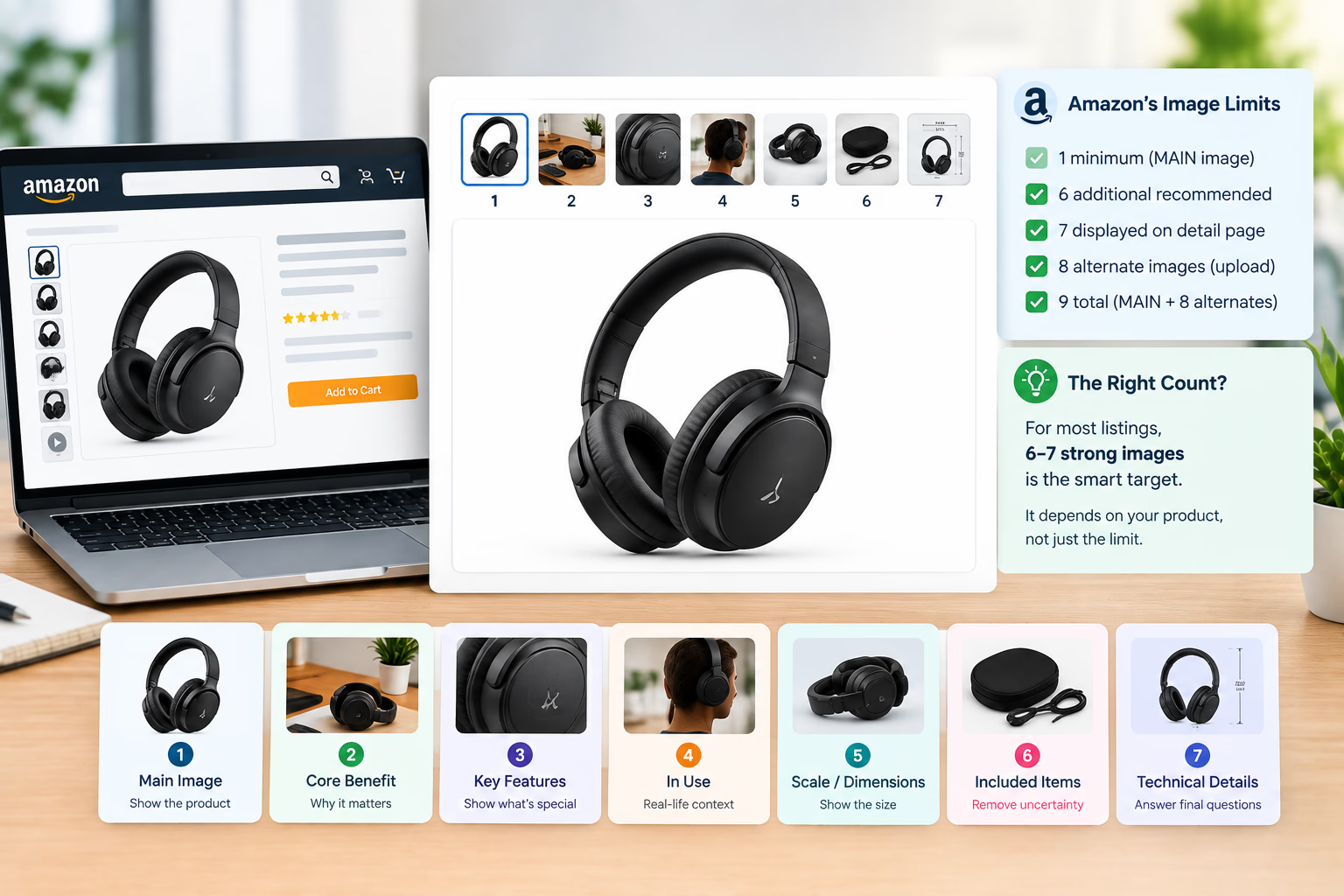

When planning Amazon listing images, brand owners often debate the ideal gallery size. The question of how many images amazon listing pages actually need comes up in nearly every creative brief. There are two different questions Amazon sellers often mix together:
- How many images can Amazon accept in Seller Central?
- How many images should you actually create for your product gallery?
They are not the same question.
Amazon's current Product Image Guide for the US marketplace states that compliant Amazon product images must adhere to strict technical guidelines, with every ASIN requiring at least one compliant MAIN image and recommending at least six additional images and one video to help customers evaluate the product.
That means Amazon's official general recommendation is effectively seven product images in total, including the MAIN image. Crucially, Amazon also states that uploading an image does not guarantee that it will appear on the product detail page.
At the same time, documented Amazon staff guidance on Seller Central confirms that standard detail pages are configured to display seven images: one MAIN image plus up to six alternate images, even though sellers can upload up to eight alternate images (Amazon Seller Central).
Understanding how many images amazon listing architectures require is not simply a matter of maxing out technical upload slots. It is about whether the visual assets you publish give shoppers enough clear, scannable information to evaluate, trust, and purchase your product.
In modern Amazon listing optimization, a high-performing product image gallery balances customer education with mobile scannability. For many catalog items, seven well-planned images is a practical production baseline. However, that is a structured planning recommendation, not an immutable conversion formula.
Amazon Image Count: Minimum Requirements, Official Recommendations, and Upload Capability
To build a high-converting gallery without wasted creative effort, keep these technical parameters distinct:
Amazon's official Product Image Guide states that every product needs at least one compliant MAIN image and recommends at least six additional images. The documentation also clarifies that Amazon algorithmically selects and arranges imagery from multiple selling partners, meaning uploading an asset does not guarantee customer-facing display.
This disproves a widespread seller assumption:
Uploading nine images does not mean shoppers will see nine thumbnails on your listing.
Furthermore, the seven-image display threshold is not a mobile-only rule. Official Amazon staff statements confirm that standard desktop and mobile detail pages display seven primary images (Amazon Seller Central). Amazon's primary documentation governs current submission rules, while staff responses clarify the front-end display limits sellers observe in the wild.
How Many Images Should You Actually Use on Your Amazon Listing?
When planning creative production, use this operational tier list:
- 1 Image (Technical Minimum): Sufficient only to create an active ASIN. Completely uncompetitive for commercial brand launches.
- 5 to 6 Images Total: Highly effective for simple commodities where every friction point, dimension, and use case can be resolved without visual filler.
- 7 Images Total (Recommended Default): The strongest planning standard for most private label and brand launches. It aligns directly with Amazon's 1 MAIN plus 6 additional images framework.
- 8 to 9 Uploaded Images: Valuable when secondary variations, technical compliance sheets, or complex sub-components provide distinct value, but never treated as guaranteed hero thumbnails.
There is no credible, Amazon-wide empirical study proving that seven images automatically convert better than six or five across all categories. Seven is not a mystical conversion sweet spot.
A more accurate description is that seven represents an optimal production target because it satisfies Amazon's catalog recommendations while filling the standard visible gallery interface.
Why Amazon Recommends Additional Images: The Job-to-Be-Done Framework
The purpose of expanding your product image gallery is not to satisfy an arbitrary visual quota. When calibrating your Amazon image count, each asset must perform a distinct communicative job.
Amazon's Seller Central guidance recommends additional images that illustrate alternative angles, real-world utility, scale, and specific feature details (Amazon Seller Central).
A structured, non-repetitive gallery typically assigns specific responsibilities across each slot:
This sequence is not legally mandated by Amazon. It is an information architecture designed to systematically eliminate buyer hesitation as shoppers swipe through your Amazon listing images.
The golden rule of gallery design remains simple: every image must deliver net-new purchasing information.
More Images Do Not Automatically Mean More Sales: The Dilution Trap
Consider a standard insulated stainless-steel water bottle. A well-constructed six-image gallery might feature:
- Isolated MAIN image showing the bottle upright.
- Cold retention infographic explaining double-wall vacuum insulation.
- Lid engineering callout detailing the leakproof seal and spout.
- Lifestyle photograph of the bottle in a gym or hiking setting.
- Dimensional chart comparing bottle height to standard cup holders.
- Clean visual of included accessories, such as cleaning brushes or alternative lids.
This sequence delivers complete information density.
However, if the brand uploads an Image 7 and Image 8 that simply display the bottle rotated 45 degrees against the same white backdrop, those images add zero strategic value.
This is where determining how many images amazon listing pages need transitions from a graphic design task into a conversion strategy. In modern Amazon listing optimization, fluff imagery dilutes attention, increases bounce rates, and bores high-intent mobile shoppers. Delivering high-impact Amazon product images that directly answer customer questions will always outperform bloated galleries.
Before commissioning any asset, ask: What specific customer doubt or objection does this graphic eliminate? If your team cannot articulate a clear answer, cut the image.
Six Images vs. Seven Images: Decision Matrix
Choosing between six and seven images is the most frequent decision brand managers face. The answer depends strictly on product complexity.
Six Images Are Ideal When:
- The product has a single, self-evident purpose (e.g., cutting board, gym towel, mousepad).
- Technical specifications are minimal and easy to comprehend.
- Sizing is universally understood with zero compatibility dependencies.
- A single lifestyle shot fully demonstrates the usage environment.
- A seventh asset would merely rephrase previous bullet points.
Seven Images Are Justified When:
- The product includes multiple proprietary mechanisms or advanced materials.
- Physical dimensions, weight ratings, or clearance tolerances require clear spatial proof.
- Multiple user demographics or distinct use cases exist.
- Hardware compatibility or software integration must be verified before purchase.
- Unboxing components or secondary accessories need visual itemization.
The seventh image must resolve a tangible buying question. It should never exist merely to occupy an empty slot.
Category-Specific Image Count Benchmarks
Different product categories demand fundamentally different visual workloads:
Simple Commodities: Silicone Spatula Example
A shopper evaluating a silicone kitchen spatula needs answers to straightforward questions:
- What is the exact head shape and flexibility?
- Is it food-grade silicone and BPA-free?
- What is the maximum heat resistance rating?
- How long is the handle relative to deep pots?
- Is it dishwasher safe?
These five questions can be communicated crisply across four secondary images. Forcing seven images onto this ASIN inevitably introduces redundant filler shots.
Complex Electronics: Wireless Mechanical Keyboard Example
Conversely, a wireless mechanical keyboard introduces substantial technical friction:
- What switch types are installed (linear, tactile, or clicky)?
- Does it support Bluetooth 5.3, 2.4GHz wireless dongle, and USB-C wired mode?
- What is the battery capacity with backlighting active versus turned off?
- Are the keycaps double-shot PBT or ABS?
- Is the layout compatible with both macOS and Windows keybindings?
- What accessories are inside the box (keycap puller, extra switches, braided cable)?
Here, a full seven-image gallery is essential. Omitting the compatibility matrix or switch breakdown directly drives customer support tickets and preventable returns.
Furniture: Spatial Context and Scale Integrity
Furniture demonstrates why image volume must connect to spatial comprehension. Shoppers struggle to visualize physical furniture inside their homes.
Research conducted by the Baymard Institute revealed that 42% of e-commerce users actively attempt to determine product dimensions directly from product imagery, and that contextual, in-scale visuals drastically improve spatial understanding (Baymard Institute).
For an office desk, sofa, or shelving unit, seven images provide the bandwidth required to show:
- Isolated studio hero shot.
- Fully styled room environment.
- Material joinery and frame durability.
- Functional features (cable trays, adjustable legs, reclining levers).
- Human in-scale context demonstrating legroom and posture.
- Dimensional blueprint showing width, depth, and clearance.
- Assembly breakdown illustrating hardware and estimated setup time.
The 7-Image Conversion Stack: An Actionable Architecture
When your product justifies a complete gallery, execute this standardized seven-asset framework:
1. Compliant MAIN Product Image
Display the exact physical item included in the purchase against a seamless pure white background (#FFFFFF). Ensure the product occupies 85% or more of the frame, free from text overlays, watermarks, or unincluded accessories.
2. Primary Benefit Driver
Lead with the single most compelling consumer outcome. Avoid technical jargon. Frame the visual around relief from pain, time savings, or enhanced performance.
3. Anatomical Feature Infographic
Deconstruct the core engineering that makes the primary benefit possible. Use clean pointer callouts, minimal typography, and clear visual hierarchy to explain technical superiority.
4. Real-World Lifestyle Context
Place the product inside its natural operational environment. Show authentic human interaction that validates ergonomic comfort, portability, or aesthetic appeal.
5. Scale, Dimensions, and Spatial Comparison
Eliminate sizing ambiguity. Pair numerical dimensions with familiar reference objects (e.g., smartphones, standard doorways, vehicle trunks) to anchor physical proportions instantly.
6. Value-Add Proof and Included Components
Showcase everything included in the retail packaging. Baymard's usability research demonstrated that online shoppers routinely use secondary gallery images to deduce product features and verify included accessories prior to checkout (Baymard Institute).
7. Risk Reversal, Compatibility, or Setup Guide
Resolve the final point of hesitation. Detail system requirements, installation workflows, warranty protections, or customer support availability to seal the purchase decision.
For a comprehensive agency blueprint on structuring high-converting listing creative, explore our Amazon listing image count methodology.
What About Slot 8 and Slot 9? Managing Additional Uploads
Seller Central allows sellers to upload up to eight alternate images alongside the MAIN image. However, remember that upload capability does not guarantee customer visibility.
Amazon seller support documentation has clarified that standard detail page interfaces restrict upfront thumbnail display to seven images (Amazon Seller Central). Additional assets past slot seven are accessible only if a shopper actively clicks through a full-screen gallery lightbox.
Therefore, approach images eight and nine as secondary contingency assets:
- When to Upload 8 or 9 Images:
- * Complex machinery requiring step-by-step wiring schematics.
- * Multi-language ingredient lists or mandatory regional regulatory certifications.
- * Extensive sizing charts covering wide apparel size ranges.
- When to Stop at 7 Images:
- * Standard consumer goods where all purchase objections are resolved.
- * When extra uploads would merely repeat angles already depicted.
- * When production budgets are better allocated toward 3D rendering quality or video production.
Integrating Image Strategy with Bullets and A+ Content
An Amazon listing functions as an integrated communication ecosystem. Your image gallery should work in concert with written copy, not in isolation.
If your product bullet points clearly describe:
- 304 food-grade stainless steel construction.
- 24-ounce volumetric capacity.
- Fits standard automotive cup holders.
- Leakproof silicone gasket seal.
Your image gallery should visually demonstrate those exact claims rather than restating the text verbatim.
- Bullet Claim: 24 oz capacity fitting standard cup holders.
- Visual Demonstration: Show the bottle seated inside an automotive cup holder with a clear scale annotation.
- Bullet Claim: Leakproof silicone gasket.
- Visual Demonstration: High-resolution 3D cutaway showing the compressed gasket seal preventing fluid bypass.
This visual verification technique builds immediate buyer confidence while respecting the shopper's scanning habits.
Want to audit your Amazon listing image count and gallery architecture? Book a zero-pressure strategy call with our creative team.
📅 BOOK A FREE 1-ON-1 STRATEGY MEETINGMobile Usability Considerations for Listing Galleries
While the seven-image display threshold applies across both desktop and mobile layouts, mobile user behavior introduces unique constraints.
Baymard's digital commerce usability studies revealed that 56% of shoppers explore product imagery as their immediate first action upon landing on a product page (Baymard Institute).
On mobile screens, gallery thumbnails are compressed into a horizontal swipe carousel. This creates specific design requirements:
- Macro Legibility: Typography on infographics must remain legible at mobile zoom levels without requiring pinch-to-zoom gestures.
- Crop Safety: Ensure core product visuals and callouts do not bleed off screen edges during responsive resizing.
- Contrast Separation: Use defined background contrast so product silhouettes remain distinct against bright mobile displays.
A seven-image gallery with illegible text performs far worse than a clean five-image gallery designed with mobile-first clarity.
Pre-Publishing Amazon Listing Image Checklist
Before pushing an updated image stack to Seller Central, verify your assets against this operational checklist:
- ☑ Does the listing have a fully compliant, isolated MAIN image on pure white (#FFFFFF)?
- ☑ Does the gallery provide at least six additional images as recommended by Amazon?
- ☑ Does every secondary image answer a unique, identifiable purchasing question?
- ☑ Is the primary customer benefit immediately clear within the first three gallery slots?
- ☑ Are physical dimensions and spatial scale anchored with relatable reference points?
- ☑ Are all included box accessories itemized to eliminate buyer assumptions?
- ☑ If a seventh image is included, does it resolve a genuine compatibility or technical objection?
- ☑ Have you verified that all text callouts remain readable on a mobile smartphone display?
- ☑ Are all claims consistent with current Amazon category and seller policies?
Frequently Asked Questions
How many images should an Amazon listing have?
Amazon's official US Product Image Guide requires at least one compliant MAIN image and recommends uploading at least six additional images plus a video, establishing seven total images as the standard production baseline. The optimal number varies by product complexity: simple items perform well with five to six focused images, while technical products benefit from the full seven slots.
What is the maximum number of images you can upload to Amazon?
Sellers can upload up to nine images in Seller Central: one MAIN image plus eight alternate images. However, Amazon staff guidance notes that standard detail pages display seven primary images upfront. Any images beyond seven are tucked behind an overflow thumbnail counter or full-screen view.
Is seven images better than six on Amazon?
Seven images is not an automatic conversion guarantee. Seven is a practical target because it aligns with Amazon's official recommendation of one MAIN plus six additional visuals. If a product's value proposition is fully communicated in six images, adding a seventh weak or repetitive image can lower overall engagement.
Does Amazon show all nine uploaded images?
Not necessarily. Amazon's official documentation notes that uploading an image does not guarantee it will appear on the detail page. Amazon algorithmically organizes and displays imagery from multiple brand registry and vendor contributions, and standard layouts prioritize seven visible image slots.
How many images should a simple Amazon product have?
Simple consumer commodities (such as basic kitchen utensils or water bottles) typically need five to six high-quality images. Once the product's appearance, material, scale, and primary benefit are established, forcing additional images creates visual clutter without improving conversion rates.
How many images should electronics have on Amazon?
Feature-rich electronics typically justify a complete seven-image gallery. Shoppers need to verify port configurations, operating system compatibility, battery life, setup procedures, and exact package contents before completing an order.
Should you create nine images just because Amazon allows nine uploads?
No. Upload capacity should never dictate creative production. Commissioning filler photographs simply to hit a technical maximum wastes budget and dilutes customer attention. Every image in your gallery must justify its presence by removing a specific buying objection.
Should every Amazon listing use the same seven-image template?
No. While the 7-Image Conversion Stack provides an effective structural baseline, your creative execution must reflect your product's specific friction points. High-fashion apparel requires colorway swatches and fabric close-ups, while power tools require safety certifications and application demos.
Final Takeaway: Strategy Dictates Image Count
Amazon's official Product Image Guide recommends one compliant MAIN image plus at least six additional images, making seven total assets the logical foundation for modern listing optimization. Amazon staff statements confirm that standard detail page interfaces display seven images before truncating the view.
However, image volume must never become a surrogate for visual quality.
The question every seller must answer when deciding how many images amazon listing pages require is: How many distinct visual answers does my customer need before they feel confident purchasing?
If five or six images answer every material objection, stop there. If your product involves setup complexity, spatial constraints, or accessories, utilize all seven slots with precision. If secondary compliance diagrams or size matrices exist, upload them to slots eight and nine as reference assets.
The most profitable listings on Amazon do not simply upload the most files. They construct cohesive visual systems that answer questions, build authority, and convert browsing shoppers into buyers.
Review our complete Amazon listing image count playbook to upgrade your brand's visual conversion architecture.
Written by Talha Waseem, Technical Strategist at Grow Orbit Source standards referenced: Amazon US Product Image Guide, Seller Central Staff Guidelines, Baymard Institute Usability Research.